Manage Issues Kanban-Style in My Redmine with the Issues Panel Plugin
In this article, we explain how to use the Issues Panel plugin in My Redmine, a Redmine-based cloud service, to manage issues in a kanban-style layout.
With the Issues Panel, you can visually organize and manage issues using cards, making it easier to understand project progress and workload at a glance.
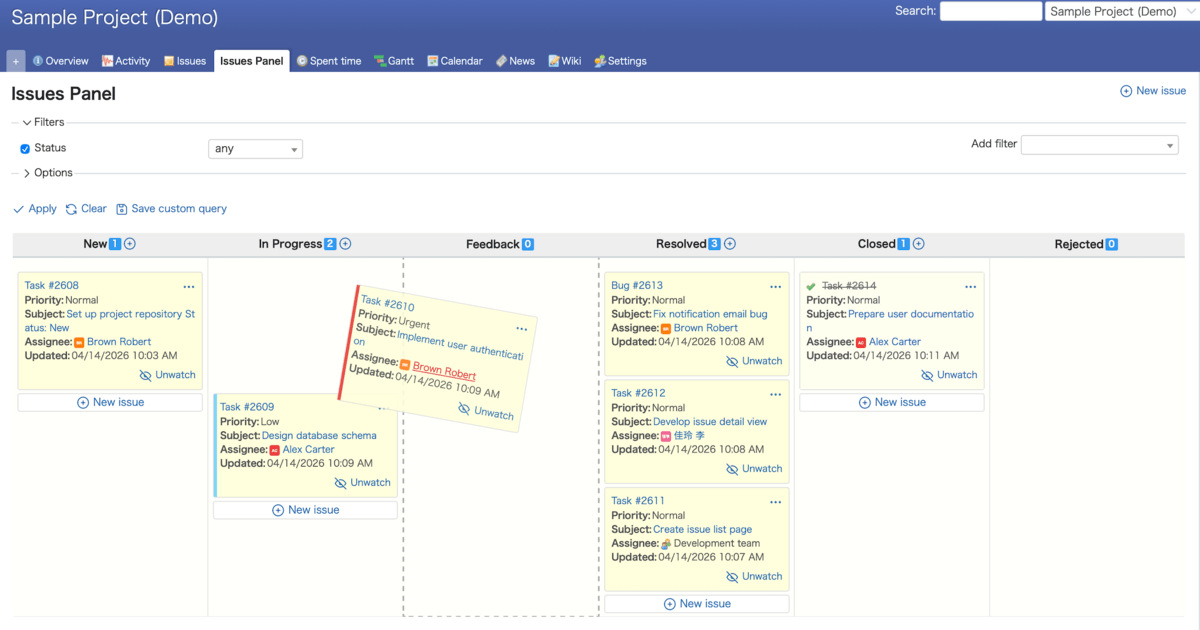
Table of Contents
- What Is the Issues Panel?
- Key Features of the Issues Panel
- How to Use the Issues Panel
- Benefits of the Issues Panel
- Available as Open Source
- Summary
What Is the Issues Panel?
The Issues Panel is a plugin that displays the Redmine issue list as cards in a kanban-style layout.
It comes pre-installed in My Redmine Global Edition, so you can start using it immediately on any plan.
Issues are grouped by status, allowing you to easily visualize overall project progress and workload distribution.
Key Features of the Issues Panel
The Issues Panel provides the following features:
-
Card-based issue display
Issues are displayed as cards, improving visibility and making information easier to understand -
Column layout by status
Issues are organized into columns based on their status, enabling quick understanding of project progress -
Drag-and-drop status updates
Move issues between columns to update their status intuitively -
Detailed information on cards
Each card displays key details such as title, assignee, due date, and priority
How to Use the Issues Panel
Here is a basic overview of how to use the Issues Panel. For more details, please refer to Issues Panel.
Display Settings
You can enable or disable the Issues Panel from the project settings screen.
It is also possible to customize:
- The type of information displayed
- The display order
Changing Issue Status
You can easily update an issue’s status by dragging and dropping it into another status column.
Viewing Issue Details
Hover over a card to display the issue description. Click on a card to view detailed information about the issue.
Benefits of the Issues Panel
Using the Issues Panel provides the following advantages:
-
Intuitive operation
Manage issues easily with drag-and-drop interactions -
Visual clarity
Quickly grasp project progress and bottlenecks with a kanban-style view -
Improved team collaboration
Makes it easier for team members to share and understand issue status -
Well-suited for Agile development
Works seamlessly with Agile methodologies such as Scrum
Available as Open Source
The Issues Panel, originally developed as a feature for My Redmine, is also available as an open-source plugin.
https://github.com/redmica/redmine_issues_panel
Summary
By using the Issues Panel plugin, you can manage issues in Redmine more intuitively and efficiently.
If you are using My Redmine Global Edition, we encourage you to give it a try and experience a smoother workflow.
Try It Now with My Redmine!
You can try out My Redmine today with our Free Trial. Experience the benefits of cloud-based Redmine firsthand by exploring its features and usability.
Click here for My Redmine Free Trial
You can try My Redmine for free for up to two months (until the end of the following month).