Make Task Management in My Redmine Even More Convenient: Use Markdown Task Lists
In this article, we introduce the task list feature available in My Redmine using Markdown syntax.
By using task lists, you can prevent small tasks from being overlooked or forgotten.
(The task list feature is part of Redmine’s standard functionality.)
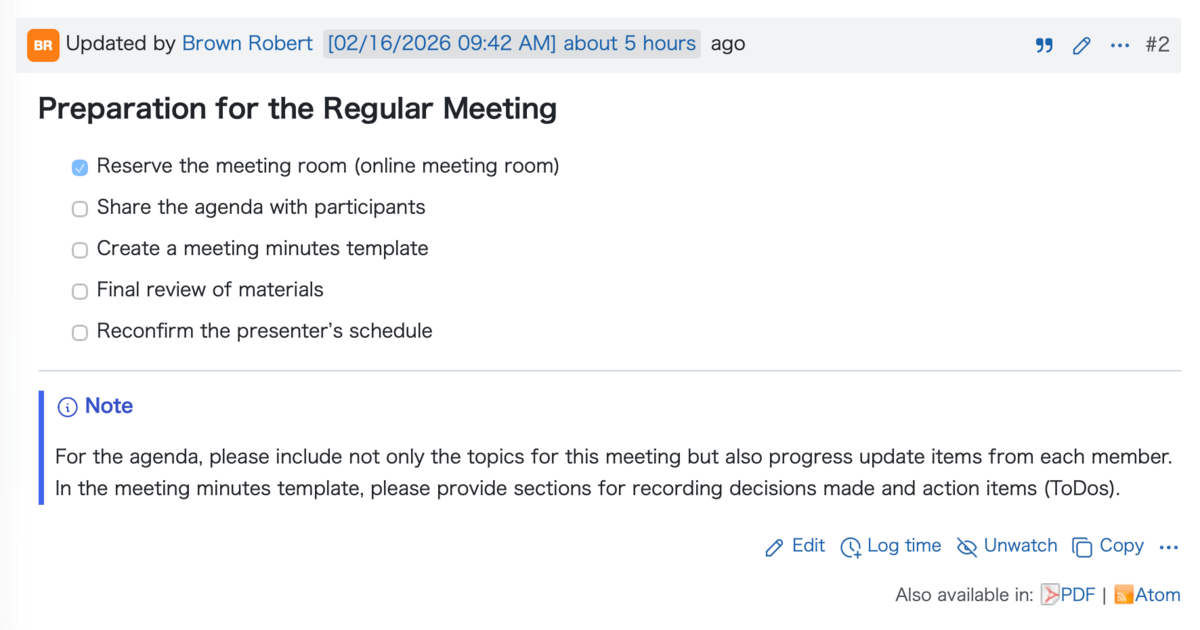
Table of Contents
- Settings Required to Use Task Lists
- How to Write Task Lists Using Markdown
- Examples of Using Task Lists
- Summary
Settings Required to Use Task Lists
To use the task list feature, you need to set Redmine’s text formatting to CommonMark Markdown. Please check the following steps:
- Go to Administration > Settings > General
- From the Text formatting dropdown, select CommonMark Markdown (GitHub Flavored)
- Click the Save button at the bottom of the page

Once this setting is enabled, CommonMark Markdown syntax can be used throughout Redmine.
How to Write Task Lists Using Markdown
You can easily create a task list by following these steps:
- Start the line with a standard list marker (
*) - Add a half-width space after the list marker
- Enter
[ ]next. Be sure to include one half-width space inside the brackets - Leave
[ ]for incomplete tasks, and use[x]or[X]for completed tasks
Examples:
* [ ] Incomplete task
* [x] Completed task
A more practical example looks like this:
* [x] Reserve the meeting room (online meeting room)
* [ ] Share the agenda with participants
* [ ] Create a meeting minutes template
* [ ] Final review of materials
* [ ] Reconfirm the presenter’s schedule
Editing Task Lists
After saving, the task list will be displayed as a list with checkboxes.
To update the checklist, simply edit the issue and change [ ] to [x] for completed items.
Examples of Using Task Lists
Both task lists and child issues are used to break down work into smaller tasks, but each has its own ideal use case.
When Task Lists Are a Good Fit
-
Managing simple tasks
When you want to list small tasks or procedures within an issue without creating separate issues -
No need for individual assignees or due dates
When each item does not require its own assignee, due date, or progress tracking -
Personal task notes
When using a checklist for personal work that does not need to be shared with the entire team
When Child Issues Are a Better Fit
- When detailed task management is required
If each task needs its own assignee, due date, progress percentage, comments, or detailed records
Summary
Markdown-based task lists in My Redmine are a powerful tool for making day-to-day task management more efficient. By using task lists and child issues appropriately depending on the situation, you can effectively prevent tasks from being missed or forgotten.
Try It Now with My Redmine!
You can try out My Redmine today with our Free Trial. Experience the benefits of cloud-based Redmine firsthand by checking out its features and usability.
Click here for My Redmine Free Trial
You can try My Redmine for free for up to two months (until the end of the next month).