Enhance Redmine’s UI with UI Extension! Visualize Diagrams Using Mermaid Macros
In this article, we introduce the Mermaid macro feature provided by UI Extension, a plugin for My Redmine, and explain how to create diagrams easily using text.
With the Mermaid macro, you can visualize processes, structures, and interactions directly within issues and Wiki pages—without using any external tools.
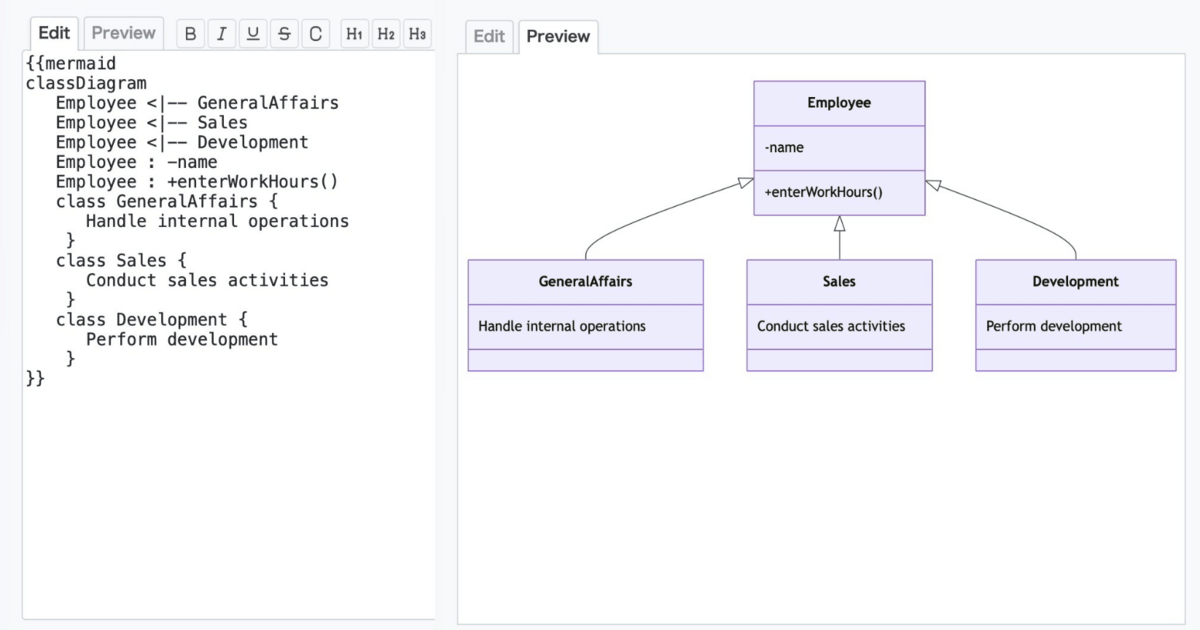
Table of Contents
What Is UI Extension?
UI Extension is a plugin developed for the Redmine-based cloud service My Redmine Global Edition. It is also available as open source.
This plugin enhances usability and visibility in Redmine through various features, including:
- Attachment preview
- Keyword-based filtering in select boxes
- Burndown charts by version on the roadmap screen
These improvements make it easier to manage projects and navigate information efficiently.
UI Extension, a pre-installed plugin in My Redmine
What Is the Mermaid Macro?
The Mermaid macro is a feature that allows you to generate diagrams using simple text-based syntax (Mermaid notation).
With Mermaid, you can easily create diagrams such as:
- Flowcharts
- Sequence diagrams
- Gantt diagrams
- Class diagrams
- State diagrams
- Pie charts
In My Redmine, you can write Mermaid syntax directly in Wiki pages or issue descriptions, and it will automatically be rendered as a diagram.
No additional tools are required—everything is done within Redmine.
What Can You Do with Mermaid?
Mermaid supports a wide range of diagram types for different use cases:
- Flowcharts: Visualize workflows and decision-making paths
- Sequence diagrams: Show interactions between components over time
- Gantt diagrams: Manage schedules and dependencies
- Class diagrams: Represent system structure and relationships
- State diagrams: Illustrate state transitions
- Pie charts: Display data proportions
You can also create ER(Entity Relationship) diagrams and user interaction diagrams, making Mermaid a versatile tool for both technical and non-technical users.
Benefits of Using Mermaid Macros
-
No external tools required
Create diagrams directly within Redmine without switching applications -
Simple and intuitive syntax
Easy to learn, even without programming knowledge -
Improved communication
Visual representations make complex information easier to understand
How to Use Mermaid Macros
To use the Mermaid macro in My Redmine, write your diagram using Mermaid syntax and wrap it with {{mermaid}} as shown below:
{{mermaid
graph TD
A[Start] --> B{Is it green?};
B -- Yes --> C[Go ahead];
B -- No --> D[Stop];
}}
In this example, a simple flowchart is defined using Mermaid syntax.
When rendered in My Redmine, it will appear as a visual diagram, allowing you to quickly understand the process flow.

For more advanced syntax and options, refer to the official Mermaid documentation:
https://mermaid.js.org/
Summary
The Mermaid macro feature in UI Extension significantly enhances Redmine’s ability to present information visually.
By enabling you to create diagrams such as flowcharts and sequence diagrams directly from text, it improves communication, clarity, and collaboration within your team.
We encourage you to try UI Extension and experience how Mermaid macros can streamline your project documentation and workflows.
Try It Now with My Redmine!
You can try out My Redmine today with our Free Trial. Experience the benefits of cloud-based Redmine firsthand by exploring its features and usability.
Click here for My Redmine Free Trial
You can try My Redmine for free for up to two months (until the end of the following month).